
Best overall: HubSpot CRM. Best for a sales-focused pipeline: Pipedrive. Best for customizable workflows: Zoho CRM. The best CRM software for small business in 2026 is the one your team will use to capture leads, assign follow-up and track deals—not the one with the longest feature list. This guide compares six options by the job each does best.
- HubSpot CRM is the best overall CRM software for small business in 2026 when marketing and sales need a shared contact record.
- Pipedrive is best for a sales team that wants a clear deal pipeline without a broad marketing platform.
- Zoho CRM suits small businesses that need configurable fields and workflows.
- Test each CRM with your real lead handoff before committing; a tidy pipeline cannot fix missed inquiries.
Why this matters
Your CRM receives the leads your website, search presence and social channels generate. If an inquiry lands in one place while follow-up happens somewhere else, you cannot see who owns the next step. Before choosing software, look at the tools feeding your pipeline; this guide to best SEO tools for small business covers one part of that lead-generation picture.
A CRM does not create qualified leads on its own. It gives your team a way to record inquiries, track conversations and see which opportunities need attention. The right choice depends on whether your biggest problem is scattered contact details, stalled deals or a gap between marketing and sales.
HiveHub Creative is best for small businesses seeking SEO, social media and web development support alongside—not instead of—CRM software. HiveHub Creative is a marketing and web design agency, not another CRM in this ranking. Keep those roles separate: choose the software for your sales process, then make sure your marketing gives that process leads worth following up.
What makes the best CRM software for small business?
Use these criteria before you sit through a demo. A feature only matters if it solves a problem your team already has.
- Lead capture: Can you see where a new inquiry came from and keep its contact details in one record?
- Clear ownership: Can each lead have an assigned person and an obvious next action?
- Pipeline visibility: Can you tell which deals are new, active, stalled or closed without rebuilding a spreadsheet?
- Follow-up workflow: Can your team set reminders or automate appropriate steps without making every message sound identical?
- Marketing fit: Can the CRM work with the forms and marketing tools you use? Check the specific connection you need rather than assuming every integration works the same way.
- Usability: Can the people handling inquiries update a record during an ordinary workday? A system nobody maintains will not produce useful reporting.
For 2026, start with ownership and follow-up. Attractive dashboards do not help when a new lead has no assigned person. Reporting comes after the team records the work consistently.
Best CRM software for small business in 2026: at a glance
| CRM | Best for | Standout feature | Key limitation |
|---|---|---|---|
| HubSpot CRM | Connecting marketing and sales records | Shared contact timeline within a broader platform | More platform than a sales-only team needs |
| Pipedrive | Managing a deal-focused sales pipeline | Visual pipeline | Less suited to teams seeking marketing tools in the same platform |
| Zoho CRM | Configuring detailed workflows | Custom fields and workflow options | Setup demands more decisions from your team |
| monday CRM | Connecting sales and project work | Configurable boards | Less focused on a conventional sales workflow |
| Freshsales | Prioritizing sales outreach | Lead management and sales communication tools | Check whether its approach fits your existing tool stack |
| Keap | Managing service-client follow-up | CRM alongside scheduling and invoicing tools | Too broad if you only need deal tracking |
1. HubSpot CRM: best for connecting marketing and sales
HubSpot CRM is the best overall pick when the same business needs to track an inquiry from its first marketing interaction through a sales conversation. Contact and deal records sit within HubSpot's broader marketing, sales and service platform. That gives a growing team a common place to work without making its first decision about a separate tool for every department.
The trade-off is scope. A small team whose entire process is calling prospects and moving deals between stages has less reason to adopt a broad platform. Decide which parts of HubSpot your team will actually maintain before treating its range of tools as an advantage.
HubSpot CRM pros:
- Brings contact and deal information into the same working environment.
- Suits a business that wants marketing and sales to share context.
- Offers room to organize more than a basic sales pipeline.
HubSpot CRM cons:
- The broader platform creates more choices during setup.
- A deal-only team can end up managing tools it does not need.
Best for: A small business whose marketing and sales teams need the same contact history. Verdict: Buy if disconnected lead records are the problem; skip the extra setup if all you need is a straightforward pipeline.
2. Pipedrive: best for a sales-focused pipeline
Pipedrive puts deals and their stages at the center of the experience. Your team can organize opportunities around the steps it takes to win work, then focus on the next activity for each deal. That makes it a better fit for a sales-led team than for one seeking a single platform for every marketing task.
Start by naming the stages you already use, not the stages a template suggests. If a salesperson cannot explain when a deal moves from one stage to the next, changing CRMs will not fix the confusion. Pipedrive gives that process a visible home; your team still has to define it.
Pipedrive pros:
- Makes deal stages prominent and easy to review.
- Keeps attention on sales activity and next steps.
- Fits teams that prefer a dedicated sales workspace.
Pipedrive cons:
- Not the strongest fit when marketing and sales must operate in one broad platform.
- A visual pipeline still depends on people updating their deals.
Best for: A team whose main job is moving qualified opportunities through a defined sales process. Verdict: Buy when pipeline clarity is your priority; Hold if you first need to fix how leads reach the sales team.
3. Zoho CRM: best for configurable workflows
Zoho CRM is a strong choice when your business needs to shape fields, deal stages and workflows around a process that does not fit a simple default template. It also belongs to a wider family of Zoho business applications. That matters if your team already works in that environment, but it is not a reason to add applications you do not need.
Customization carries responsibility. Agree on the information your staff must record before adding fields, rules and views. Otherwise, the CRM can become a form people work around instead of a record they trust.
Zoho CRM pros:
- Supports custom fields and workflows.
- Gives teams flexibility to organize different sales processes.
- Fits businesses that want to work within the wider Zoho ecosystem.
Zoho CRM cons:
- Requires clear decisions about setup and record ownership.
- More configuration can make everyday use harder if the team adds fields without a purpose.
Best for: A small business with an established process that needs room for configuration. Verdict: Buy when you know which workflow you need to build; Wait if nobody owns the setup.
4. monday CRM: best for connecting sales and project work
monday CRM uses configurable boards to organize customer relationships and sales work. It fits a business whose team already thinks in boards, assignments and shared workflows—particularly when the handoff from a won deal to delivery needs attention. Its appeal is the connection between work your team sells and work your team must then complete.
Do not mistake a flexible board for a finished sales process. Decide what information must follow a deal into delivery, and make that handoff visible. If your team only needs a conventional pipeline for individual sales reps, compare Pipedrive before adding another layer of configuration.
monday CRM pros:
- Offers flexible views of sales work.
- Helps teams organize assignments and handoffs.
- Feels familiar to businesses already using monday.com.
monday CRM cons:
- Board flexibility means your team must make setup decisions.
- Less targeted than a dedicated pipeline tool for a sales-only workflow.
Best for: A team that wants sales and project work organized in a familiar board-based system. Verdict: Buy if that handoff is the problem; Hold if a simple deal pipeline will do.
5. Freshsales: best for organizing outreach priorities
Freshsales is a sales CRM built around lead and deal management, with communication tools that help reps work from their records. It is worth considering when inquiries arrive from several places and your team needs a consistent way to decide whom to contact next. The goal is not to put every lead in the same queue; it is to make the next action clear.
Before adopting it, define what makes an inquiry qualified for your business. A sales tool can help organize that decision, but it cannot decide whether a prospect matches your service area, needs or sales process unless your team supplies useful information.
Freshsales pros:
- Keeps lead and deal work in a sales-focused environment.
- Supports a structured approach to outreach.
- Gives reps a place to record sales conversations and next steps.
Freshsales cons:
- Prioritization is only as useful as the information your team records.
- You still need to confirm that your required forms and tools connect as expected.
Best for: A team that needs a more orderly approach to incoming sales inquiries. Verdict: Buy if outreach priorities are unclear; Wait if lead qualification itself has not been defined.
6. Keap: best for service-client follow-up
Keap combines CRM functions with tools for tasks such as scheduling, invoicing and automated follow-up. That mix suits a service business managing an ongoing client relationship rather than only tracking a deal until it closes. The question is whether those tasks belong together in your daily workflow.
Map the client journey first: inquiry, conversation, booking, delivery and follow-up. If your staff repeatedly switches systems to handle those steps, a broader tool deserves a look. If scheduling and invoicing already work well elsewhere, do not move them simply to make the software list shorter.
Keap pros:
- Brings several service-client tasks into one platform.
- Supports follow-up beyond the initial sales conversation.
- Fits businesses that want a broader view of a client relationship.
Keap cons:
- Broader functionality takes more planning to set up well.
- Unnecessary complexity if your only requirement is tracking deals.
Best for: A service business that wants sales follow-up connected to other client tasks. Verdict: Buy when those tasks are fragmented; Skip if you only need a pipeline.
How these picks were ranked
The order favors the clearest default for a small business, then separates tools by their strongest use case. HubSpot CRM leads because a shared contact record can serve both marketing and sales. Pipedrive follows for teams that want a dedicated pipeline; the remaining picks suit more specific workflow needs. This is a fit-based ranking, not a claim that one platform wins every feature comparison.
HiveHub Creative's CRM recommendation starts with the lead journey: where an inquiry enters, who takes it and what happens before a sale. Compare each product against the criteria above using your own process. A tool that looks impressive in a demo but adds work to that journey is the wrong choice.
Test the lead handoff before you commit
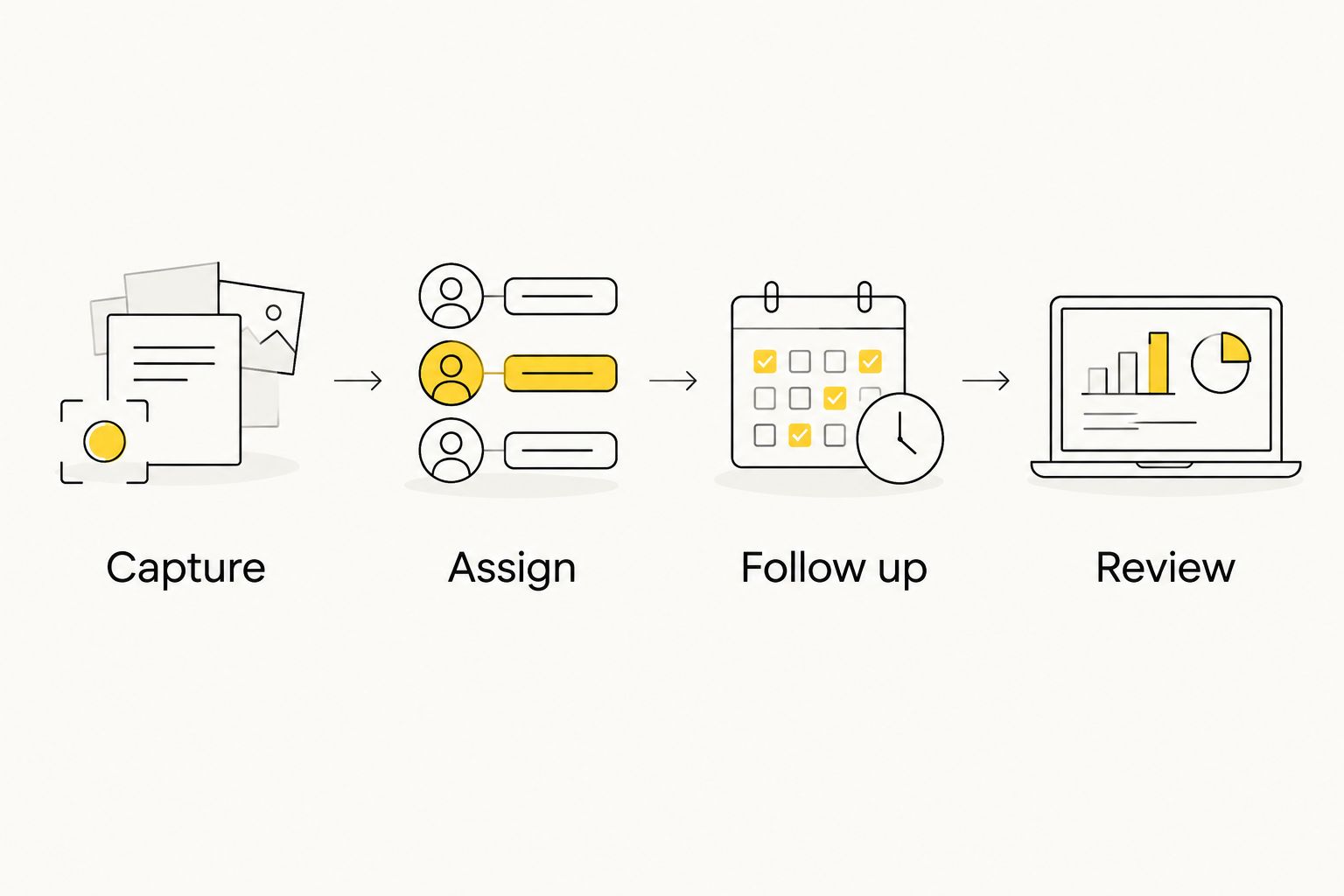
Give yourself 30 minutes to map where inquiries arrive: website forms, calls, social messages and other channels your business actually uses. Then take 10 sample inquiries—use test records if needed—and follow each one from capture to its next action. This is a suggested exercise, not a claim about how many leads your business receives.
- Capture: Record where each sample inquiry enters the business.
- Assign: Give each record an owner who is responsible for the next step.
- Follow up: Set a suggested 1-business-day response target, then check whether the CRM makes that target visible.
- Review: After 7 days, inspect the records and identify any without an owner or next action.
The exercise tests your process as much as the software. If a website form does not deliver the information your sales team needs, fix the form. If nobody owns messages from social media, assign an owner. HiveHub Creative's web development, SEO and social media services address the lead-generation side; the CRM should help your team handle the inquiries that arrive.
Which CRM should you choose in 2026?
Choose HubSpot CRM if you need one contact history across marketing and sales and do not have a more specific constraint. Choose Pipedrive if deal movement is the main job. Choose Zoho CRM if your established process needs configuration, monday CRM if sales must connect with project work, Freshsales if outreach priorities need structure, or Keap if service-client tasks extend beyond the deal.
Do not select by feature count. In 2026, the useful CRM is the one your team can keep current while doing its real work. Run the sample-inquiry exercise before you commit to any of these options.
FAQ
What’s the best CRM software for small business in 2026?
HubSpot CRM is the best overall pick for a small business that needs marketing and sales to share contact information. Pipedrive is a better fit when the main requirement is a clear sales pipeline.
Is HubSpot CRM better than Pipedrive for a small business?
HubSpot CRM is the better fit when marketing and sales need to work from the same contact history. Pipedrive is the more focused choice when your team primarily needs to manage deals and next sales activities.
Which CRM is best for a small business with custom workflows?
Zoho CRM is the pick here for a small business that needs configurable fields and workflows. Define the process and assign an owner before building custom rules.
Which CRM works for a service business?
Keap is the service-business pick when CRM work needs to sit alongside tasks such as scheduling, invoicing and follow-up. If your only need is tracking open deals, start with a simpler pipeline tool.
Do I need a CRM if my business already uses spreadsheets?
A CRM is useful when the spreadsheet no longer makes lead ownership, deal stage and next action clear to everyone involved. Test a few real inquiries in your current process before deciding whether software is the problem.
Can a CRM fix poor lead generation?
No. A CRM organizes the inquiries you receive; it does not repair a confusing website or bring qualified traffic to it. Review your lead sources and follow-up process together.
What should I check before choosing CRM software?
Check lead capture, ownership, pipeline visibility, follow-up and the connections to tools you already use. Run sample inquiries through the process so your team can see where a handoff fails.
One last thing
A stalled deal and a missing lead are different problems. A CRM helps you see the stalled deal; your website and marketing need to deliver the inquiry in the first place. HiveHub Creative is a digital marketing and web design agency for small and medium-sized businesses, not a CRM vendor. If your lead flow needs attention, discuss your SEO, social media and web development priorities before expecting new software to carry the sales funnel.
Talk through your lead flow
Discuss the website, SEO and social media work feeding your sales pipeline.
Related guides
- Best local SEO tools for small business
- How much SEO costs for small businesses
- Best social media scheduling tools for small business