Buffer, Later, SocialPilot, Sprout Social, and Loomly rank as the best social media scheduling tools for small business owners weighing options in 2026, and the right pick depends on whether you're running one Instagram grid or juggling six client accounts at once.
- Buffer wins overall for small teams posting across a few platforms without a steep learning curve.
- Later is the best social media scheduling tool for Instagram-first, visually driven brands.
- SocialPilot fits agencies and multi-location businesses managing several client accounts at once.
- Sprout Social delivers the deepest analytics but suits bigger marketing teams, not solo owners.
- Loomly’s approval workflow keeps small teams and outside contractors aligned before anything posts.
Why this matters
Posting sporadically kills momentum faster than posting badly. Platforms reward accounts that show up on a predictable rhythm, and a scheduling tool is the only realistic way a small team or solo owner hits that rhythm without rebuilding the calendar from scratch every Sunday night.
The wrong tool creates a second problem: you buy software to save time, then burn three hours a week fighting its interface instead of writing captions. Every tool ranked below gets scored against how much of that fight it removes, not how many features it stacks on a comparison page.
Social media is one piece of a bigger growth plan that also needs a site built to convert and search visibility that brings in new traffic. HiveHub Creative builds all three together instead of treating them as separate line items, because a scheduling tool without a strategy behind it just automates silence. A scheduling tool doesn't write your strategy – it just keeps you from missing your own deadlines.
“A scheduling tool doesn’t write your strategy – it just keeps you from missing your own deadlines.”
What makes the best social media scheduling tool for small business
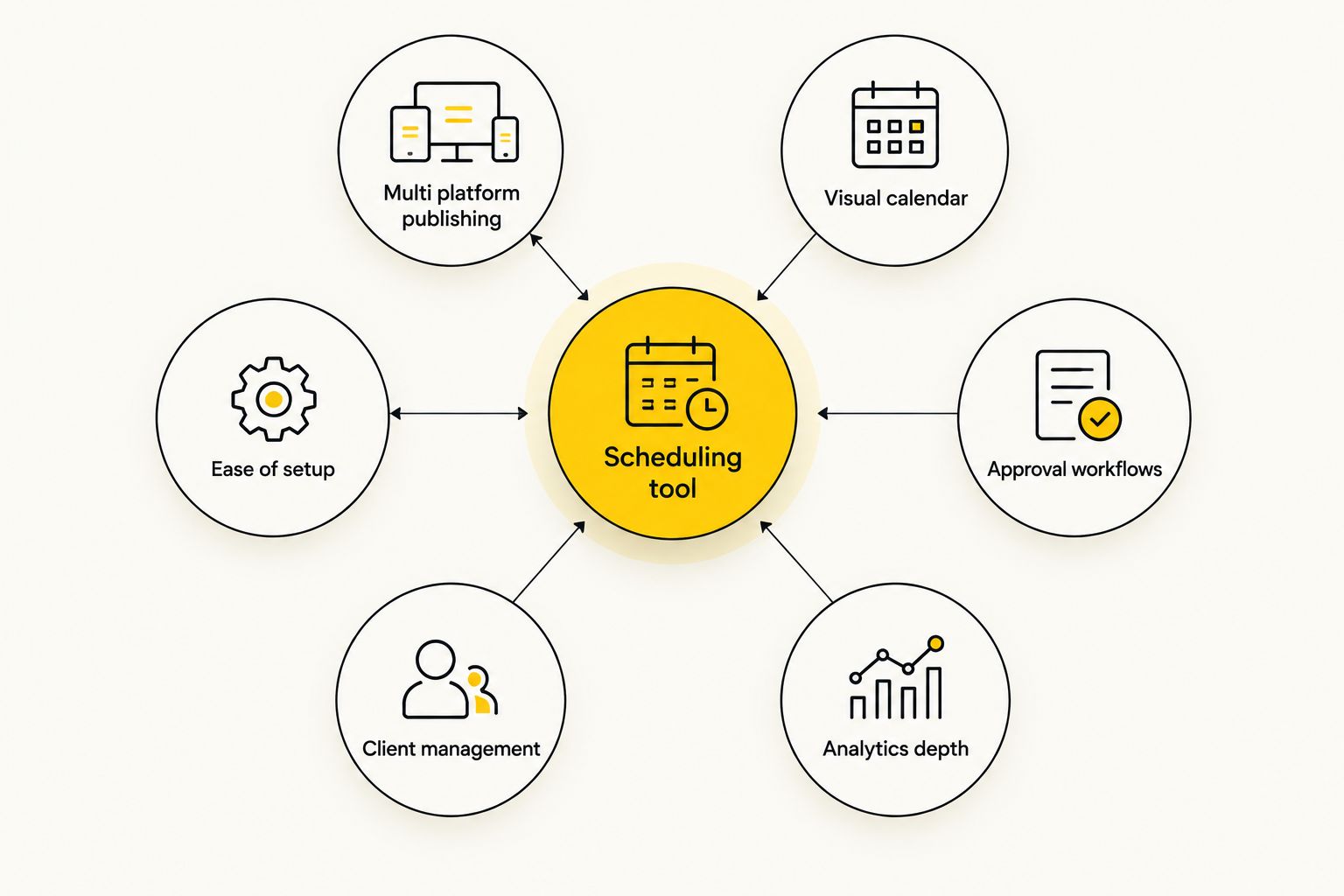
Six things separate a tool worth paying for from one that gathers dust after week two:
- Multi-platform publishing – one dashboard covers Instagram, Facebook, LinkedIn, X, TikTok, and Pinterest instead of six separate logins
- Visual content calendar – you can preview the grid or feed before anything goes live, not just scan a list of dates
- Approval workflows – a client or manager signs off before a post publishes, no surprises after the fact
- Analytics that inform strategy – engagement and reach data that changes what you post next, not a vanity dashboard
- Multi-account management – agencies and multi-location businesses need to switch between client profiles without logging out and back in
- Ease of setup – a tool your team abandons in month two because the learning curve is too steep is money wasted
At a glance: the best social media scheduling tools compared for 2026
| Tool | Best for | Standout feature | Key limitation |
|---|---|---|---|
| Buffer | Small teams posting across a few platforms | Simple publishing queue and browser extension | Lighter analytics, no built-in social listening |
| Later | Instagram-first, visually driven brands | Drag-and-drop visual grid planner | Weaker fit for text-heavy platforms like LinkedIn |
| SocialPilot | Agencies and multi-location businesses | Bulk scheduling with white-label client reports | Busier interface, steeper learning curve |
| Sprout Social | Teams that need deep analytics and social listening | Unified social inbox with sentiment tracking | Built for bigger marketing teams, not solo owners |
| Loomly | Small teams that need content collaboration | Built-in approval stages and post idea prompts | Fewer advanced analytics than Sprout Social |
1. Buffer: best social media scheduling tool for small teams posting across a few platforms
Buffer handles the core job without extra noise: connect your accounts, drop posts into a queue, and let it publish on schedule across Instagram, Facebook, LinkedIn, X, and Pinterest. The interface centers on a straightforward calendar view, and the browser extension lets you queue content while you're reading an article or scrolling a competitor's feed.
Buffer pros:
- Fast to set up – most owners are scheduling their first week of posts within an hour
- Clean calendar view that doesn't bury you in menus
- Browser extension speeds up content curation
Buffer cons:
- Analytics are basic compared to Sprout Social
- No native social listening or sentiment tracking
- Approval workflows are limited for larger teams
Best for: small business owners managing one to three platforms without a dedicated social hire.
Verdict: Buy if you want the fewest headaches getting started in 2026.
2. Later: best social media scheduling tool for Instagram-first, visually driven brands
Later built its reputation on the visual grid preview – you drag posts around a mock Instagram feed until the aesthetic works, then schedule the whole week in one pass. It's the strongest pick for brands where the look of the feed matters as much as the caption: boutiques, salons, restaurants, and photographers all lean on it.
Later pros:
- Visual grid planner shows exactly how the feed will look before you publish
- Strong Instagram and TikTok scheduling support
- Link-in-bio tool included for driving traffic from posts
Later cons:
- Less built out for LinkedIn and X scheduling
- Analytics lag behind Sprout Social's depth
- Multi-client management isn't as smooth as SocialPilot's
Best for: brands where Instagram or TikTok drives the majority of engagement.
Verdict: Buy if your feed's visual consistency is part of the brand.
3. SocialPilot: best social media scheduling tool for agencies and multi-location businesses
SocialPilot is built around switching between accounts fast – bulk-upload a month of content, assign it across a dozen client profiles, and pull white-label reports without touching a spreadsheet. A franchise running five locations gets the same benefit without needing five separate logins.
SocialPilot pros:
- Bulk scheduling saves real time when managing several accounts
- White-label reporting works well for agencies reporting back to clients
- Client account management is built in, not bolted on
SocialPilot cons:
- Interface has more going on than Buffer or Later, expect a longer onboarding
- Visual grid preview isn't as polished as Later's
- Mobile app lags behind the desktop version
Best for: agencies, franchises, or any business running more than three social accounts at once.
Verdict: Buy if you're managing accounts for more than one business or location.
4. Sprout Social: best social media scheduling tool for analytics and social listening
Sprout Social goes further than scheduling – it pulls every mention, comment, and DM into one inbox and tracks sentiment over time. That depth matters once a team is big enough to need someone watching brand conversation, not just posting on schedule.
Sprout Social pros:
- Social listening flags brand mentions and sentiment shifts across platforms
- Reporting depth supports real strategy decisions, not just vanity metrics
- Unified inbox keeps comments and DMs from multiple platforms in one place
Sprout Social cons:
- Built for bigger marketing teams, not solo owners just starting out
- Setup takes longer than Buffer or Later
- Most small businesses won't use the full feature set
Best for: businesses with a marketing team that needs listening data, not just a publishing queue.
Verdict: Hold unless someone on your team owns social full-time.
5. Loomly: best social media scheduling tool for content collaboration and approval flows
Loomly's calendar includes built-in post ideas and a structured approval stage – a draft moves from writer to reviewer to scheduled without leaving the platform. That structure matters most for small teams where more than one person touches a post before it publishes.
Loomly pros:
- Approval workflow keeps a client or manager in the loop before anything goes live
- Post idea prompts help when the content calendar runs dry
- Calendar view is clean and easy for non-marketers to follow
Loomly cons:
- Analytics are lighter than Sprout Social's
- Fewer advanced platform-specific features than SocialPilot
- Bulk scheduling isn't as fast as SocialPilot's for high account counts
Best for: small teams or businesses working with an outside contractor who need sign-off before posts go out.
Verdict: Buy if approval steps matter more than advanced analytics.
How we ranked these tools
Every tool above gets measured against the six criteria listed earlier, weighted toward ease of setup and platform coverage – that's where small businesses actually lose time in 2026, not feature depth on a comparison page. HiveHub Creative weighs those two factors highest when recommending a tool to a client, because a slick analytics dashboard doesn't matter if nobody on the team ever opens it. Multi-account management and approval workflows only count against agencies and multi-location businesses; a solo owner isn't penalized for skipping features they'll never touch.
Which social media scheduling tool should you choose?
Start with Buffer if you're a small business owner running one to three platforms and want to be scheduling by this afternoon. Switch to Later if your feed's visual quality drives most of your engagement, or to SocialPilot the moment you're managing more than three client or location accounts at once. Sprout Social earns its complexity once a dedicated team member owns social full-time – not before that. Loomly is the right call when more than one person needs to sign off before a post goes live.
The safest default for most small businesses heading into 2026 is Buffer – it covers the core job without asking you to learn a new system first. Whichever tool you choose, pair it with an actual content strategy – that's the piece HiveHub Creative builds before ever touching a scheduler.
Skip the scheduling tool guesswork
HiveHub Creative plans, posts, and manages your social accounts for you.
FAQ
What’s the best social media scheduling tool for a small business in 2026?
Buffer is the best overall pick for small businesses in 2026 because it covers multi-platform publishing without a steep learning curve. Later, SocialPilot, Sprout Social, and Loomly each win for a specific use case like visual content, multi-client management, analytics, or approval workflows.
Is Buffer better than Hootsuite for small businesses?
Buffer is generally simpler to set up and use for a small team running a few platforms, while Hootsuite leans toward larger organizations with more accounts and more complex reporting needs. For a solo owner or small team in 2026, Buffer’s lighter interface usually wins out.
Do I need a scheduling tool if I already post manually?
You don’t need one, but manual posting makes it easy to skip weeks when things get busy, and inconsistent posting hurts reach on most platforms. A scheduling tool removes the daily decision to post and just executes the plan you already made.
Can a scheduling tool replace a social media strategy?
No – a scheduling tool only executes a plan, it doesn’t decide what to post or why. Businesses that treat scheduling software as a substitute for strategy end up with a consistent stream of content nobody engages with.
How many platforms can one scheduling tool manage at once?
Most tools on this list connect to Instagram, Facebook, LinkedIn, X, TikTok, and Pinterest from a single dashboard. The exact platform list varies by tool, so check each one’s current integrations before committing.
Is Later good for TikTok scheduling?
Yes, Later supports TikTok scheduling alongside Instagram, and its visual grid planner works well for brands that plan short-form video the same way they plan a feed. It’s a stronger fit for visual platforms than for text-first platforms like LinkedIn or X.
Do agencies use different scheduling tools than small businesses?
Agencies typically lean toward tools like SocialPilot that support bulk scheduling and white-label reporting across many client accounts. A single small business usually gets more value from a simpler tool like Buffer or Later built around one brand’s calendar.
One last thing
Here's what none of these tools will tell you on their features page: the tool you pick matters less than whether you show up every single week. A mediocre tool used consistently every 30 days outperforms a great tool abandoned after a month, because platforms reward the account still posting in March 2026, not the one with the fanciest dashboard in January. Pick the tool from this list you'll actually open, connect it to your accounts today, and build the habit before you worry about upgrading the tech.
Related guides